
Chrome shipped an MCP server as part of DevTools last September that gives any AI agent structured access to web app content.
I wanted the same thing for Windows apps — so I built it.
What lvt Does
lvt (Live Visual Tree) is an open-source CLI tool that gives AI agents structured visibility into any running Windows application.
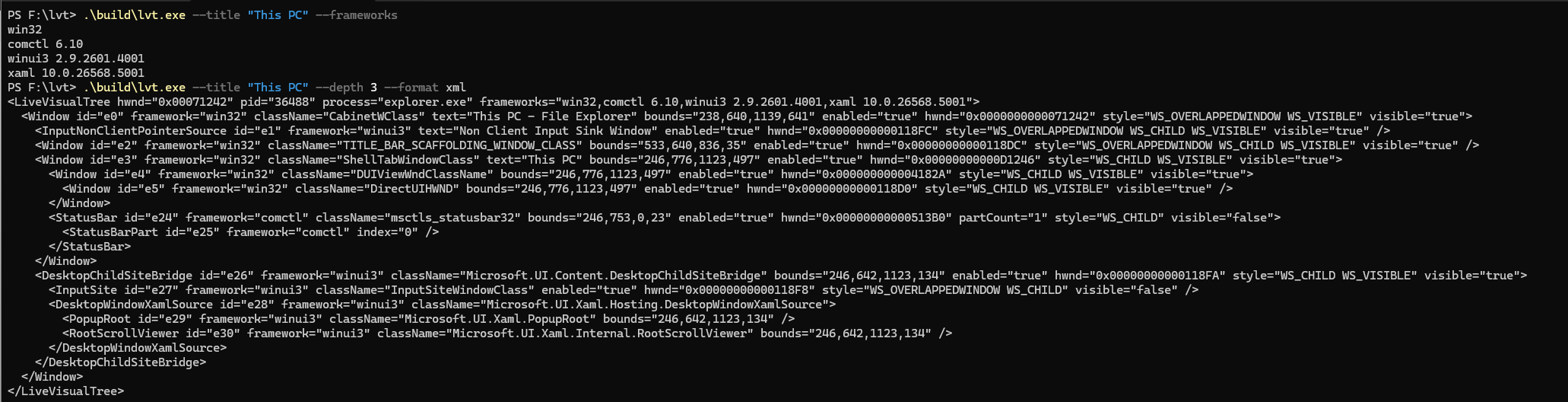
Point it at any app and it returns a unified element tree — every control, its type, text, bounds, and a stable ID — as JSON or XML that an agent can reason about directly.
# Get Notepad's visual tree as JSON
lvt --name notepad

# Capture annotated screenshot with element IDs
lvt --name notepad --screenshot out.png

# Scope to a subtree
lvt --name myapp --element e5 --depth 3
Why Not UIA?
The standard approach to Windows automation is UI Automation (UIA). It’s the accessibility layer that everything else builds on — screen readers, test frameworks, automation tools.
UIA was designed for accessibility, not AI agents. It has different performance and experience characteristics:
- It’s an accessibility projection, not the real tree
- Properties get flattened or lost in translation
- Hierarchy doesn’t match what developers wrote
- Many apps have limited UIA implementations
Every agent-driven Windows automation approach I’ve seen is either:
- UIA-based — different tradeoffs than agents need
- Screenshot + vision — expensive, fragile, can’t reason about structure
- Both — combining two approaches doesn’t eliminate their limitations
The Third Path: Direct Framework Introspection
lvt talks directly to each framework’s native tree:
- Win32/ComCtl — direct window enumeration with control type enrichment
- WinUI 3 — XAML Diagnostics API
- System XAML (UWP) — XAML Diagnostics API
No abstraction layer. No accessibility tax. The actual visual tree, as the framework sees it.
This means:
- Real property values, not accessibility projections
- Correct hierarchy that matches the code
- Faster enumeration
- Element names and types that developers recognize
What Agents Can Do With This
Precise control references: Elements get stable IDs (e0, e1, e2…) that agents can use directly. “What’s in e14?” “Click e7.” No more guessing from screenshots.
Structural reasoning: Agents can understand app layout as a tree, not just pixels. “Find the button inside the toolbar” becomes a tree query, not visual pattern matching.
Annotated screenshots: lvt can capture screenshots with element IDs overlaid. Agents can correlate visual content with the structured tree for targeted follow-up.
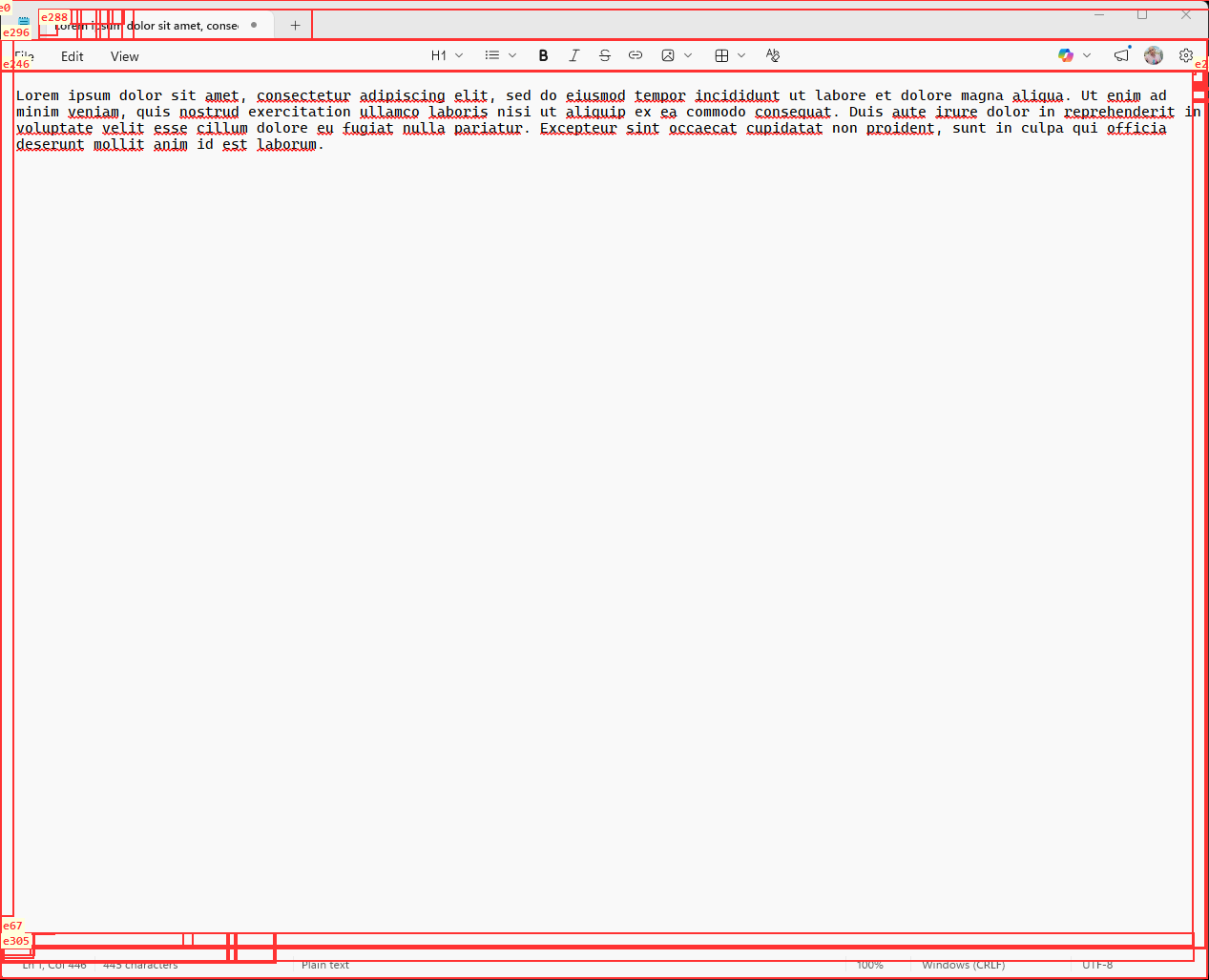
Mixed-framework apps: A WinUI 3 app hosted in Win32 chrome is fully decomposed from the top-level window down through every XAML element.
The Bigger Picture
This is a working implementation of a capability that would be incredibly useful: giving agents a structured, semantic representation of what’s on screen.
A DOM tree for Windows apps — a unified tree spanning all UI frameworks — would be incredibly useful for agents. lvt takes a pragmatic approach: it works today, on real apps, by talking directly to each framework’s native tree.
It’s also foundational for device-context intelligence. When an agent needs to understand “what’s the user looking at right now” or “what does ‘this button’ refer to,” lvt is the component that answers those questions.
Status
Working today:
- Win32
- WinUI 3
- System XAML (UWP)
- ComCtl enrichment
On the roadmap:
- WPF
- WinForms
- MAUI
- WebView2 (Chrome DevTools Protocol bridge)
The tool is MIT-licensed. I’ve also included an agent skill so GitHub Copilot CLI and other agents can use it immediately.
Try It
Repo: github.com/asklar/lvt
Install the GitHub Copilot CLI skill:
/plugin install asklar/lvt
Want to discuss? Connect with me on LinkedIn.