
Yesterday, I had the privilege of presenting at Microsoft AI Dev Days with my colleague Roberth Karman about Windows support for agentic workflows, which was announced at Ignite a couple weeks ago. Agent Connectors (MCP on Windows) are now in public preview.
Windows Architecture for Agentic Workflows
Windows provides OS-level infrastructure for agentic workflows through two key components:
On-Device Registry (ODR)
The On-Device Registry is the central place to manage, use, and configure MCP servers on Windows. It handles:
- Registry and Management - Central discovery and configuration of available MCP servers
- Policy and Consent - Enforcing security policies and user consent requirements
- Configuration - Managing server settings and capabilities
- Observability - Monitoring server health and performance
- Logging and Auditing - Tracking server usage and agent interactions for compliance and debugging
Agent Workspace
Agent Workspace is a containerized environment that provides a separate session and user context for agents to run code. The key innovation is that agents run as their own identity, not as the human user. This enables attribution: the agent did it (on behalf of the user), not the user. This provides:
- Security Isolation - Agents operate in their own sandboxed environment
- Identity Management - Each agent has its own identity separate from the user, enabling clear attribution of actions
- Resource Control - Containerization provides boundaries and resource limits
What’s Now in Public Preview: Agent Connectors (MCP on Windows)
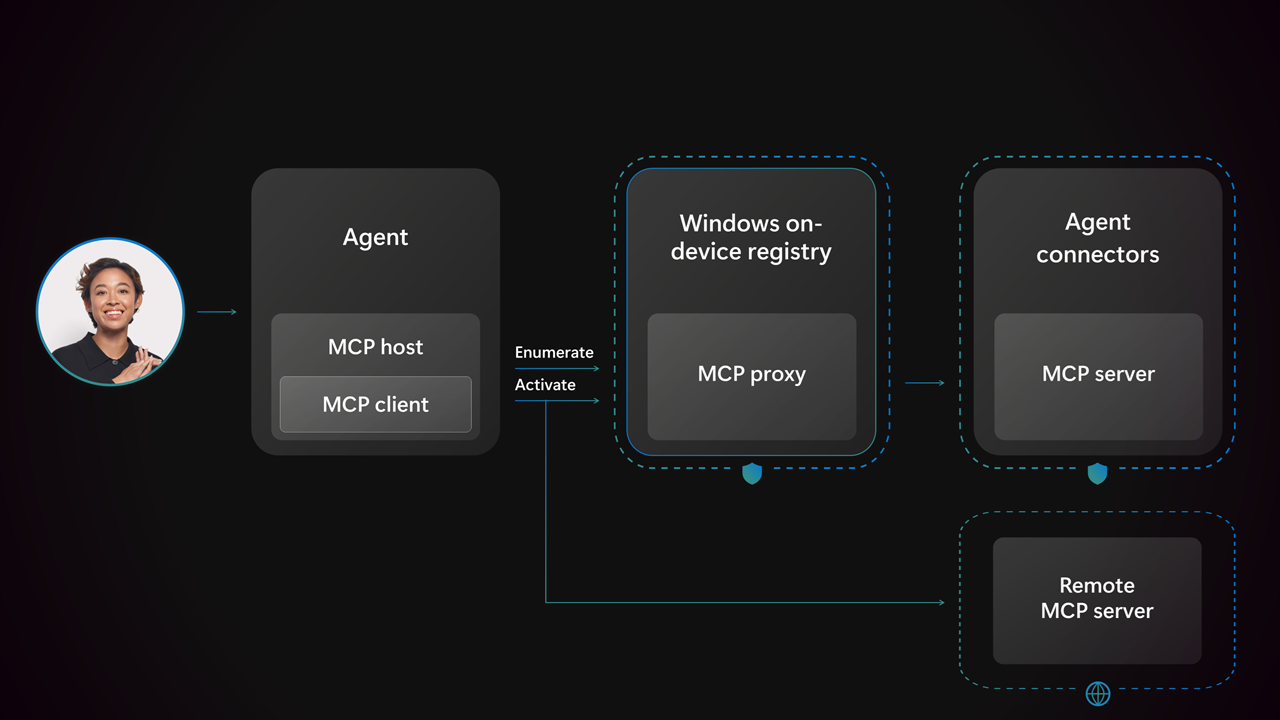 Agent Connectors bring the Model Context Protocol to Windows
Agent Connectors bring the Model Context Protocol to Windows through:
🔐 Centralized Management
The On-Device Registry provides a single place for managing all MCP servers on your system, with built-in policy enforcement and consent management.
🔒 Secure Execution
Agent Workspace runs agent code in containerized environments with separate identity, preventing agents from acting as the user and providing strong isolation boundaries.
✅ Standardized Communication
MCP provides a universal protocol for agents to communicate with applications, eliminating the need for custom integrations per agent.
✅ Enterprise-Ready
Built-in logging, auditing, and observability make it production-ready for enterprise scenarios where compliance and security are critical.
AI Dev Days Presentation
At the conference, we demonstrated how Windows enables agentic workflows through:
- On-Device Registry - How centralized MCP server management works, including policy enforcement and consent
- Agent Workspace - The containerized execution environment where agents run as their own identity
- Agent Connectors - How MCP on Windows provides standardized agent-to-application communication
- Real-world scenarios - Practical examples of the security and management benefits
The response from developers at the conference was fantastic. The questions and discussions afterwards showed genuine excitement about what this unlocks for agents on Windows.
Watch the Session
Watch our full session from AI Dev Days walking through what On-Device Registry is, how agents can use it, how developers can bring MCP servers into Windows, and more:
Try It Out
Agent Connectors (MCP on Windows) are now available in public preview. This is your opportunity to:
- Experiment with the On-Device Registry for managing MCP servers
- Build MCP servers that integrate with Windows applications
- Test agent workflows using standardized MCP communication
- Provide feedback that shapes the future of agentic workflows on Windows
We need your feedback. What agent scenarios would this unblock for you?
The Bigger Picture
This public preview represents a significant milestone in evolving Windows to support agentic workflows. We’re not just adding features—we’re providing foundational infrastructure that makes Windows a first-class platform for agent development and execution.
The Model Context Protocol provides the standardization. The On-Device Registry provides centralized management with security and compliance built-in. Agent Workspace provides secure execution. Together, they enable a new generation of agentic applications on Windows.
Get Involved
- Learn more: Visit developer.microsoft.com/en-us/windows/agentic to learn more
- Watch our session: Watch our session at AI Dev Days: YouTube
- Share feedback: File feedback on Feedback Hub or our samples repo github.com/microsoft/mcp-on-windows-samples
- Connect with me: Connect with me on LinkedIn to discuss your use cases and provide feedback
What would you build with Windows?