
If you’re building with agents today, you’re going to run into a pile of “things” that all sound similar:
They’re not redundant. They exist because they solve different layers of control.
This post explains what each one is, what it’s good for, and a decision guide for “which should I use?” — written so you can hand it to someone with zero context.
The core axes: scope, trigger, enforcement (and distribution)
When you’re deciding between these primitives, ask four questions:
1) Scope — where does it apply?
- one repo
- one user
- one session
- an entire org
2) Trigger — when does it run?
- always-on
- explicitly invoked
- automatically discovered
- event-driven
3) Enforcement — how deterministic is it?
- guidance (model can ignore)
- packaging (reusable but still model-driven)
- gates (hard allow/deny)
4) Distribution — how does it propagate?
- Personal install (user-level): installed once, used across repos you touch
- Repo install (checked in): travels with the codebase; everyone gets it on clone
If you pick by these axes, “which thing do I build?” becomes straightforward.
A simple map (how these compose)
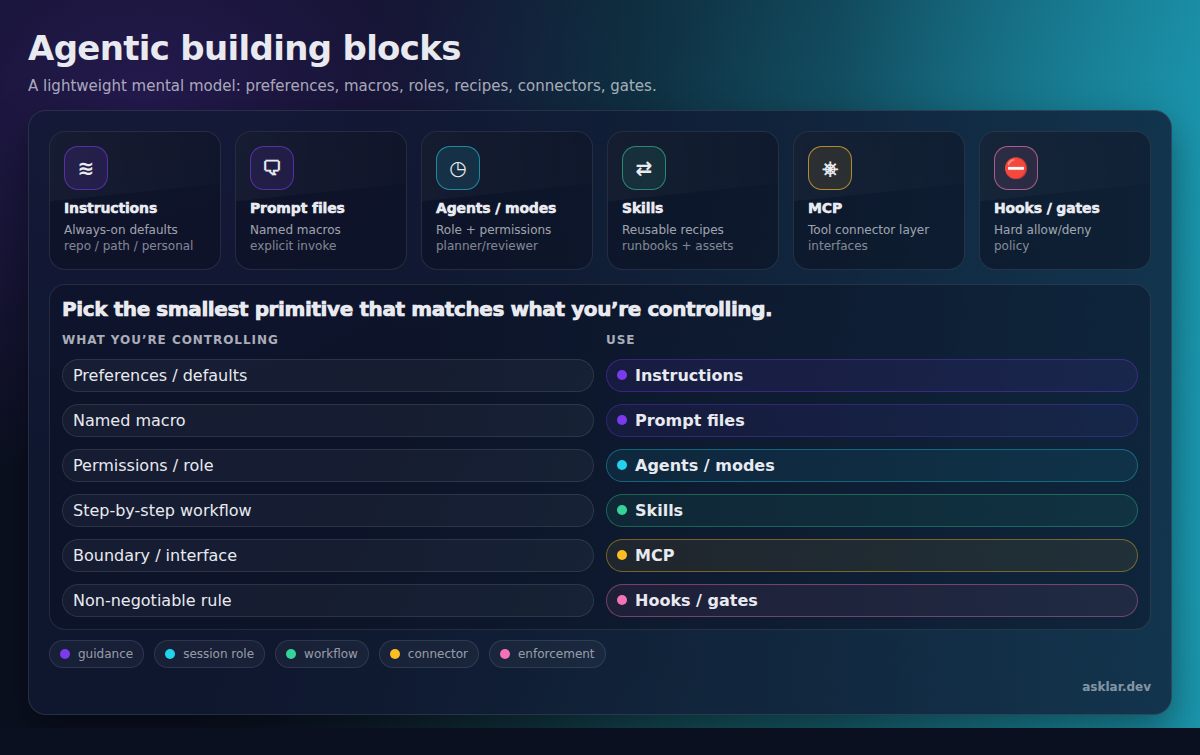
Think of it like a stack:
- Instructions/prompt files shape behavior.
- Custom agents define “who is the agent right now” and what tools it’s allowed to use.
- Skills package repeatable workflows + assets.
- MCP is an optional connector layer that exposes tools/resources to the agent (often external systems, sometimes local tools too).
- Hooks enforce non-negotiables.
1) Instructions (always-on defaults)
Docs (GitHub Copilot / CLI): Response customization
What it is: a set of rules that are automatically included in context.
Important nuance: instructions typically stack from multiple scopes:
- Repo-wide instructions (checked in; team defaults)
- Path-specific instructions (only apply to certain files/globs; keeps rules local)
- Personal instructions (your preferences, not the team’s)
If your agent feels “mysteriously inconsistent”, a good debugging move is to inspect which instruction files were loaded for the session (many hosts expose a /instructions-style command).
Use it when: you want the agent to behave consistently without anyone remembering to invoke anything.
Great for:
- coding conventions, naming, lint expectations
- security defaults (least privilege, no secrets in code)
- process defaults (“always show diff before asking me to merge”)
Don’t use it when:
- you need a named workflow people can invoke
- you need deterministic enforcement (use hooks)
Rule of thumb: instructions should be short and stable. If they change weekly, they’re a prompt or a skill.
2) Prompt files (named plays)
Docs (GitHub Copilot / CLI): Prompt files (VS Code)
What it is: an explicitly invoked prompt template (often a slash command).
Use it when: you keep typing the same thing over and over.
Great for:
- “write release notes from these commits”
- “summarize this PR as a changelog entry”
- “generate an RFC from these bullets”
Don’t use it when:
- you need bundled files/scripts/templates (use a skill)
- you want always-on standards (instructions)
Rule of thumb: prompt files are the “macros” of agent work.
3) Custom agents / modes (role + tool boundary)
Docs (GitHub Copilot / CLI): Custom agents
What it is: a pre-defined agent configuration you select for a session: persona + allowed tools + guardrails.
This is the sharpest tool for preventing expensive mistakes.
Use it when: you need different behavior/tooling for different phases:
- planning vs implementation
- review vs edit
- security/audit vs coding
Great for:
- a Planner that can read but not edit
- a Reviewer that can run checks but not push changes
- an Implementer that can edit files and run tests
Don’t use it when:
- you just need a one-off task template (prompt)
- you need a reusable multi-step workflow with assets (skill)
Rule of thumb: modes are “roles on a team”. If you’d separate the work between two humans, split it into two modes.
4) Skills (packaged workflows)
Docs (GitHub Copilot / CLI): Agent skills
What it is: a folder-packaged runbook: the instructions plus whatever assets the workflow needs (templates, scripts, reference files).
Skills are “recipes”: multi-step workflows that get pulled in when relevant, rather than living as always-on background context.
Use it when: the workflow is multi-step and you want it to be repeatable.
Great for:
- incident triage playbooks
- postmortem generation (with templates)
- project bootstrap scaffolding
- “evaluation loops” (feedback → analysis → proposed change)
Don’t use it when:
- it’s just a standard rule (instructions)
- it’s just a one-shot template (prompt)
- you’re actually trying to connect to a live system (MCP)
Rule of thumb: if you’re attaching files, scripts, templates, or examples, you’re in skill territory.
5) Plugins (distribution package for a host)
Docs: (varies by host; “plugin” is not a single universal standard in Copilot docs)
What it is: an installable unit for a specific host ecosystem (Copilot, VS Code, internal CLI, etc.).
A plugin can contain many things: skills, prompt files, agents, scripts, metadata.
Use it when: adoption and lifecycle matter:
- install/update/uninstall
- discovery (catalog/marketplace)
- compatibility/versioning
Great for:
- packaging capabilities so teams can install them a la carte
- sharing a consistent bundle without copying files repo-to-repo
Don’t use it when:
- you’re still exploring and changing the workflow daily (skills/prompts iterate faster)
- you need cross-host portability (plugins are usually host-coupled)
Rule of thumb: skills are content. plugins are shipping.
6) MCP servers (tools/resources connector layer)
Docs (GitHub Copilot / CLI): MCP
What it is: a standard protocol for exposing tools and resources to an agent.
Often, those tools/resources front a live external system (GitHub, tickets, cloud, databases). But MCP can also be used to wrap local capabilities (for example, a locally running service that brokers auth, or a tool that’s easier to expose over a protocol).
Use it when: the agent needs capabilities or data that aren’t already in its local context, especially when you want a stable interface:
- GitHub/AzDO operations
- ticketing systems
- cloud control planes
- databases / internal services
Great for:
- “create an issue / comment on a PR / fetch build logs”
- “query a service dashboard and summarize anomalies”
Don’t use it when:
- all you need is static guidance or a local workflow
- you can accomplish the same thing with a CLI without running a server
Rule of thumb: MCP is about interfaces and connectivity. If you’re not exposing tools/resources across a boundary (process, machine, auth domain), MCP is usually overkill.
7) Hooks (deterministic policy gates)
Docs: Hooks
What it is: event-driven checks that can allow/deny an operation at execution time.
Use it when: “the model should always…” is not good enough.
Great for:
- blocking dangerous commands
- enforcing compliance checks
- audit logging
Don’t use it when:
- the rule is subjective or fuzzy
Rule of thumb: if violating the rule is catastrophic, make it a hook.
Distribution cheat sheet (personal vs repo)
Different tools name this differently, but the pattern is consistent:
- Personal: great for rapid iteration and power users; teammates won’t see it unless you document it.
- Repo: great for onboarding and consistency; versioned and reviewed like code.
Here’s where these artifacts most commonly live:
- Instructions: repo (and sometimes org-managed)
- Prompt files: repo
- Custom agents / modes: repo (sometimes personal)
- Skills: both (personal skill library or repo-scoped skills)
- Plugins: personal install via marketplace/registry (the plugin itself may deliver repo-scoped content)
- MCP servers: both (workspace config vs user config)
- Hooks: repo/org (because enforcement should be shared)
Chooser matrix (pick the smallest thing that works)
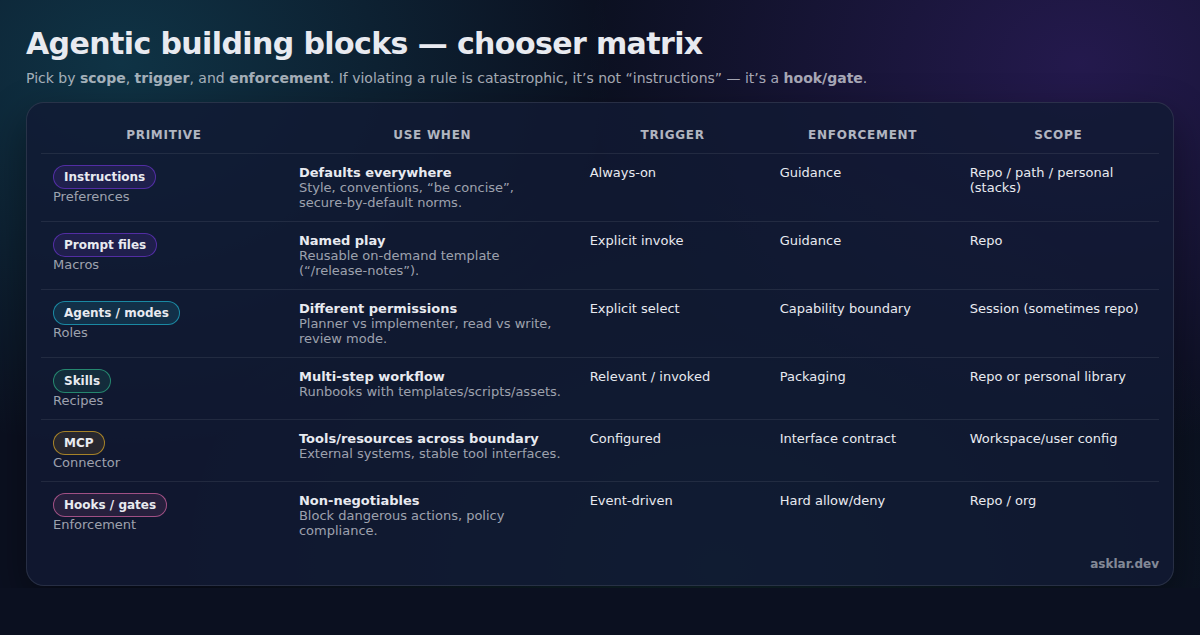
One nuance: plugins are orthogonal. If you need distribution + install/update + catalog UX, wrap whatever you built (prompts/skills/agents) inside a plugin.
What “good” looks like (a minimal stack)
Most teams don’t need all of this.
A sane starting point: 1) Instructions for baseline rules 2) 3–5 prompt files for your most common plays 3) Two modes (Planner + Implementer) if you’re doing real code changes 4) 1–2 skills for the workflows you want repeatable 5) MCP only where you need tool/resource connectors 6) Hooks only for non-negotiables
The goal is not to build an “AI config cathedral.”
The goal is to pick the smallest building block that makes your agent work more reliable, more reusable, or more adoptable.
Final note: it’s all just text (and that’s a feature)
At the end of the day, most of these “building blocks” are files containing text: markdown instructions, prompt templates, and lightweight configuration.
What makes them powerful isn’t the file format. It’s the conventions:
- common names (instructions, prompt files, custom agents, skills)
- common locations (
.github/...,~/.copilot/...) - common semantics (what gets loaded automatically vs manually)
Those conventions are converging across tools.
A concrete example: Agent Skills is an open, lightweight format centered around a folder with a SKILL.md file (YAML frontmatter + markdown instructions), designed for progressive disclosure (discover → activate → execute).
That’s the real story: we’re starting to get a shared vocabulary for packaging agent behavior.
If this was useful, connect with me on LinkedIn.